Do QR Codes Expire?
No, a QR code itself never expires. It’s just a pattern of black and white squares, and nothing in that pattern has a date on it. But a QR code can stop working when the thing it points to is switched off. Whether that can happen depends on the type of code:
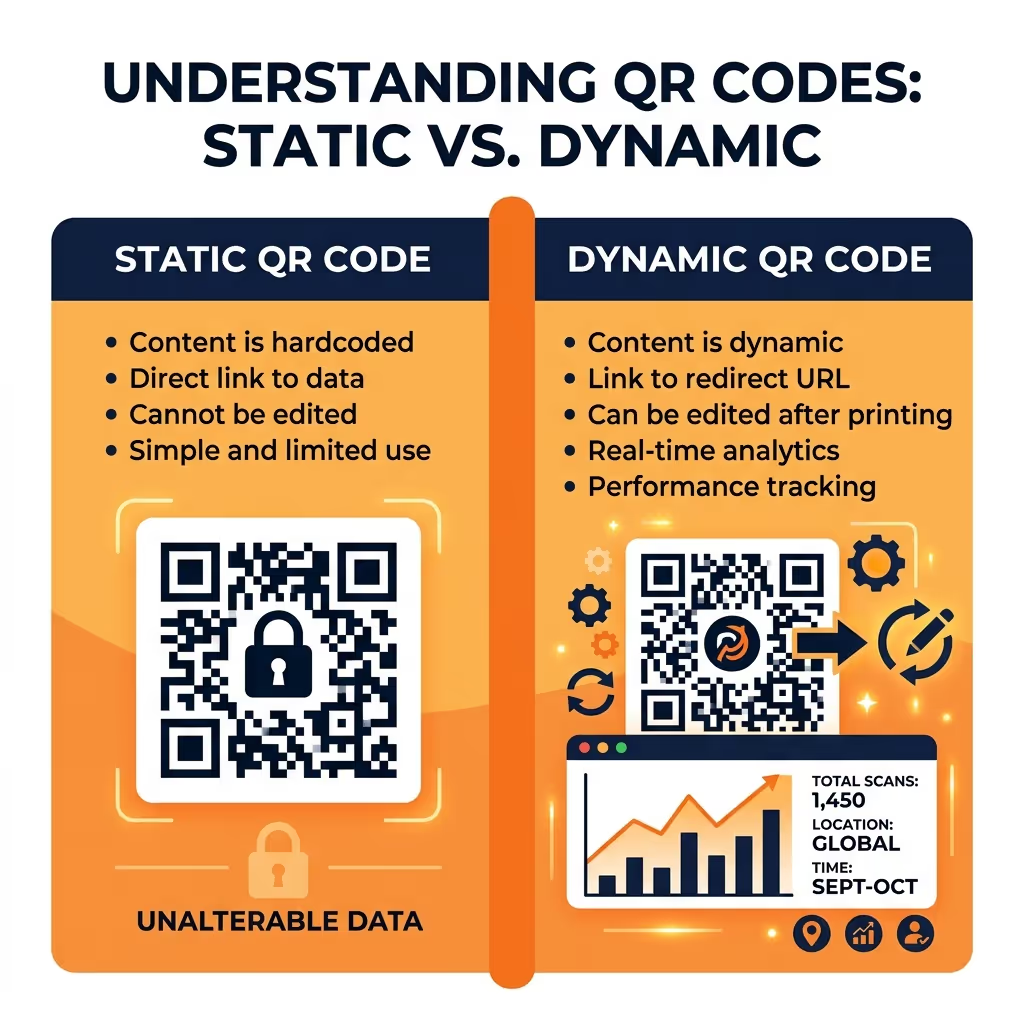
- Static QR codes never expire. Your link, WiFi details or contact card are stored inside the pattern. No server is involved, so there’s nothing to switch off.
- Dynamic QR codes can be deactivated. They contain a short redirect link owned by a QR code company. If your trial ends, your subscription lapses or the company shuts down, the redirect stops and the code shows an error.
So when someone says “my QR code expired,” what usually happened is that a dynamic code’s redirect was turned off.
How to Tell If Your QR Code Will Expire
Scan the code with your phone camera and look at the link preview before you tap it:
| What you see in the preview | Type | Can it expire? |
|---|---|---|
Your own website (e.g. yourcafe.com/menu) | Static | No |
| A WiFi network name, contact or text | Static | No |
A short link on a QR company’s domain (e.g. qr.example/x7Ab) | Dynamic | Yes, if the provider turns it off |
7 Reasons a QR Code Stops Working (and How to Fix Each)
1. The free trial or subscription ended
This is the most common cause. Many “free” generators create dynamic codes by default, then deactivate them after a trial.
Fix: You can reactivate the plan with that provider, or create a new static code that points directly to your link and reprint. To avoid it next time, use a generator that clearly says your codes are static, like the free EverQR generator.
2. The QR code company shut down
If a dynamic code’s provider goes out of business, its redirect server goes with it.
Fix: Unfortunately the printed code can’t be rescued. Reprint with a static code, or with a dynamic code that uses a domain you control.
3. The website it points to is gone
A static code never expires, but if the page it links to is deleted, your domain lapses, or the URL changes, people will land on an error page.
Fix: Keep the old URL alive and redirect it to the new page. That way the printed code keeps working without reprinting. This is also why it’s smart to link codes to your own domain.
4. The WiFi password changed
A WiFi QR code stores your network name and password. Change either one and the code connects to nothing.
Fix: Create a new WiFi QR code with the new details. It takes 30 seconds.
5. The print is too small, blurry or damaged
Phones need clear edges to read a code. Scratches, folds, glare from glossy laminate, or printing below about 2 × 2 cm (0.8 × 0.8 in) cause failures.
Fix: Reprint larger, download the SVG version for sharp print at any size, and use a matte finish where possible.
6. Low contrast or inverted colors
Light code on a light background, or a light code on a dark background, confuses many scanners.
Fix: Keep the pattern dark and the background light. Our design tips cover safe color choices.
7. Too much data or no margin
Long URLs create dense patterns that are hard to scan, and codes printed without a white border (the “quiet zone”) often fail.
Fix: Shorten the link before generating, and leave a clear margin around the code of at least four modules (small squares) wide.
How to Make a QR Code That Never Expires
- Open the free QR code generator on EverQR.
- Choose Website URL, WiFi, Social or Contact.
- Enter your details and click Generate.
- Download as PNG or SVG.
That’s a static QR code: no account, no trial, no scan limit, no expiry date. For a full walkthrough, see how to make a permanent QR code for free.
When an Expiring (Dynamic) Code Is Still the Right Choice
Dynamic codes aren’t bad. They’re the right tool when you need to change the destination after printing or see how many people scan. The key is knowing you’re paying for a service, and choosing one that’s fair if you stop paying.
With EverQR Pro ($5.99/month), dynamic codes that lapse are paused, not deleted, and work again as soon as you resubscribe. Read what a dynamic QR code is to decide if you need one.
FAQ
Do QR codes expire after a certain time?
No. There’s no built-in expiry in the QR code standard. Static codes work forever. Dynamic codes work as long as the provider keeps the redirect active.
Why did my free QR code stop working?
Most likely it was a dynamic code from a generator that deactivates codes after a free trial. Scan it and check the preview: a short link on the generator’s domain confirms it.
Can a QR code be scanned unlimited times?
Yes. A static QR code can be scanned an unlimited number of times. Some dynamic plans cap scans per month.
Do QR codes expire on Google, Canva or other free tools?
If the tool puts your actual link inside the code, it’s static and won’t expire. If it gives you a short link on its own domain, it’s dynamic and depends on that service. Always check the scan preview.
How long does a QR code last?
A static QR code lasts as long as the printed material is readable and the content it points to exists. There’s no time limit.